4.6. Computer Programs#
4.6.1. Program Design#
Algorithm 4.1 (Linear Multistep Method for IVPs)
Define the IVP
The ODE \(y'=f(t, y)\)
The interval of definition \(I=[\text{tStart}, \text{tEnd}]\)
Number of points \(N\) on \(I\)
Step size \(h=(\text{tEnd}-\text{tStart})/(N-1)\)
Initial values: \(t_0\), \(y_0\), \(f_0\)
Produce starting values from step \(1\) to step \(k-1\):
\(y_1\), \(y_2\), …, \(y_{k-1}\)
\(f_1\), \(f_2\), …, \(f_{k-1}\)
Apply the linear multistep method for the remaining steps
Output the result \(\{y_j\}_{j=0}^{N-1}\)
4.6.2. Example Programs#
In order to illustrate the predictor-corrector methods computationally, three programs with the corresponding function definitions and the solution tables are appended below:
Program 1 (Matlab and Python) - solves the problem using the exact solution to find the starting values, followed by the \(4^\text{th}\)order ABM method for the remaining integration points.
Program 2 (Matlab and Python) - implements the classic \(4^{th}\)–order Runge–Kutta method for computing the starting values, followed by the \(4^{th}\)order ABM method for the remaining integration points.
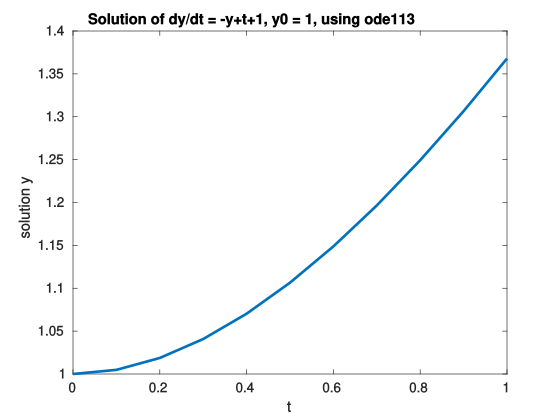
Program 3 (Matlab only) - uses the ODE solver ode113 (based on non-stiff ABM methods) from the ODE solver routines built-in Matlab. This will be discussed in detail using Matlab documentation attached.
Run these programs to check your results for Example 4.2.
4.6.2.1. Program 1 (Matlab and Python)#
Using the analytical solution to produce starting values.
The following code has been tested under Matlab 2025
 1%%1-> Define the IVP
 2% declare an ode function (definition given at the end of the code)
 3f=@odeFunc;
 4
 5% step size
 6h=0.1;
 7
 8% number of steps
 9nsteps=11;  %number of steps
10
11% initial conditions
12t(1)=0.0;   %independent variable time t
13y(1)=1.0;   %initial value of the dependent variable y
14F(1)=f(t(1),y(1)); %calculate the value of y'=F, at t(1), y(1).
15yp(1)=0.0;      %set first predictor value=0 (for formatting table of output)
16
17%%2-> Produce starting values
18for i=2:4               %calculate the first 3 starting values using the exact solution
19    t(i)=t(i-1)+h;          %calculate the next step in t
20    y(i)=exp(-t(i))+t(i);   %exact solution used for calculating starting values
21    F(i)=f(t(i),y(i));
22    yp(i)=0.0;
23end
24
25%%3-> Apply a multistep method
26for i=5:nsteps      %calculate the remaining y values using ABM 4th order method
27    t(i)=t(i-1)+h;
28    yp(i)=y(i-1)+(h/24)*(55*F(i-1)-59*F(i-2)+37*F(i-3)-9*F(i-4));
29    F(i)=f(t(i),yp(i));
30    y(i)=y(i-1)+(h/24)*(9*F(i)+19*F(i-1)-5*F(i-2)+F(i-3));
31    F(i)=f(t(i),y(i));
32end
33
34%%4-> Output the result
35disp('x        yp         y          F         y_ex      AbsError');
36for i=1:nsteps
37    yex(i)=exp(-t(i))+t(i);
38    abserror(i)=abs(yex(i)-y(i));
39    fprintf('%4.2f %10.7f %10.7f %10.7f %10.7f %11.8f\n', t(i),yp(i),y(i),F(i),yex(i),abserror(i));
40end
41% --------------------------------------------------------------------------
42% Defining the ODE problem (or function) to be solved
43function f=odeFunc(t,y)
44    f=-y+t+1;
45end
The output of this code is:
x        yp         y          F         y_ex      AbsError
0.00  0.0000000  1.0000000  0.0000000  1.0000000  0.00000000
0.10  0.0000000  1.0048374  0.0951626  1.0048374  0.00000000
0.20  0.0000000  1.0187308  0.1812692  1.0187308  0.00000000
0.30  0.0000000  1.0408182  0.2591818  1.0408182  0.00000000
0.40  1.0703229  1.0703197  0.3296803  1.0703200  0.00000031
0.50  1.1065330  1.1065301  0.3934699  1.1065307  0.00000056
0.60  1.1488135  1.1488109  0.4511891  1.1488116  0.00000075
0.70  1.1965868  1.1965844  0.5034156  1.1965853  0.00000091
0.80  1.2493301  1.2493279  0.5506721  1.2493290  0.00000103
0.90  1.3065705  1.3065685  0.5934315  1.3065697  0.00000111
1.00  1.3678800  1.3678783  0.6321217  1.3678794  0.00000117
 1#6G6Z3017 Computational Methods in ODEs - Chapter 3, Example 2(Python Program 1)
 2#Scriptfile to solve a single 1st order Ordinary Differential Equation,
 3#using the exact solution to calculate the starting values and
 4# the 4th order Adams-Bashforth-Moulton method
 5# for the remaining integration time span.
 6import math
 7import numpy as np
 8
 9def f(t,y):
10    return -y+t+1;
11
12h=0.1;
13nsteps=11;
14#declare arrays
15t=np.zeros(nsteps);
16y=np.zeros(nsteps);
17yp=np.zeros(nsteps);
18F=np.zeros(nsteps);
19yex=np.zeros(nsteps);
20abserror=np.zeros(nsteps);
21#initial values
22t[0]=0.0;
23y[0]=1.0;
24yp[0]=0.0;
25F[0]=f(t[0],y[0]);
26#calculate the first 3 starting values using the exact solution
27for i in range(1,4):
28    t[i]=t[i-1]+h;
29    y[i]=math.exp(-t[i])+t[i];
30    F[i]=f(t[i],y[i]);
31    yp[i]=0;
32#use multiple-step method to calculate y
33for i in range(4,nsteps):
34    yp[i]=y[i-1]+(h/24)*(55*F[i-1]-59*F[i-2]+37*F[i-3]-9*F[i-4]);
35    t[i]=t[i-1]+h;
36    F[i]=f(t[i],yp[i]);
37    y[i]=y[i-1]+(h/24)*(9*F[i]+19*F[i-1]-5*F[i-2]+F[i-3]);
38    F[i]=f(t[i],y[i]);
39#screen output
40print(" t       yp         y          F         y_ex      AbsError");
41for i in range(nsteps):
42    yex[i]=math.exp(-t[i])+t[i];
43    abserror[i]=abs(yex[i]-y[i]);
44    print("%4.2f %10.7f %10.7f %10.7f %10.7f %11.8f" %(t[i],yp[i],y[i],F[i],yex[i],abserror[i]))
The output of this code is:
 t       yp         y          F         y_ex      AbsError
0.00  0.0000000  1.0000000  0.0000000  1.0000000  0.00000000
0.10  0.0000000  1.0048374  0.0951626  1.0048374  0.00000000
0.20  0.0000000  1.0187308  0.1812692  1.0187308  0.00000000
0.30  0.0000000  1.0408182  0.2591818  1.0408182  0.00000000
0.40  1.0703229  1.0703197  0.3296803  1.0703200  0.00000031
0.50  1.1065330  1.1065301  0.3934699  1.1065307  0.00000056
0.60  1.1488135  1.1488109  0.4511891  1.1488116  0.00000075
0.70  1.1965868  1.1965844  0.5034156  1.1965853  0.00000091
0.80  1.2493301  1.2493279  0.5506721  1.2493290  0.00000103
0.90  1.3065705  1.3065685  0.5934315  1.3065697  0.00000111
1.00  1.3678800  1.3678783  0.6321217  1.3678794  0.00000117
4.6.2.2. Program 2 (Matlab and Python)#
Using the RK4 method to produce starting values.
The following code has been tested under Matlab 2025
 1%%1-> Define the IVP
 2% declare an ode function (definition given at the end of the code)
 3f=@odeFunc;
 4
 5% step size
 6h=0.1;
 7
 8% number of steps
 9nsteps=11;  %number of steps
10
11% initial conditions
12t(1)=0.0;   %independent variable time t
13y(1)=1.0;   %initial value of the dependent variable y
14F(1)=f(t(1),y(1)); %calculate the value of y'=F, at t(1), y(1).
15yp(1)=0.0;      %set first predictor value=0 (for formatting table of output)
16
17%%2-> Produce starting values
18for i=2:4   % calculate the next 3 starting values using RK 4th order method
19    k1=h*f(t(i-1),       y(i-1));
20    k2=h*f(t(i-1)+h*0.5, y(i-1)+k1*0.5);
21    k3=h*f(t(i-1)+h*0.5, y(i-1)+k2*0.5);
22    k4=h*f(t(i-1)+h,     y(i-1)+k3);
23    y(i)=y(i-1)+(1/6)*(k1+2.0*(k2+k3)+k4);
24    t(i)=t(i-1)+h;
25    F(i)=f(t(i),y(i));
26    yp(i)=0.0;
27end
28
29%%3-> Apply a multistep method
30for i=5:nsteps      %calculate the remaining y values using ABM 4th order method
31    t(i)=t(i-1)+h;
32    yp(i)=y(i-1)+(h/24)*(55*F(i-1)-59*F(i-2)+37*F(i-3)-9*F(i-4));
33    F(i)=f(t(i),yp(i));
34    y(i)=y(i-1)+(h/24)*(9*F(i)+19*F(i-1)-5*F(i-2)+F(i-3));
35    F(i)=f(t(i),y(i));
36end
37
38%%4-> Output the result
39disp('x        yp         y          F         y_ex      AbsError');
40for i=1:nsteps
41    yex(i)=exp(-t(i))+t(i);
42    abserror(i)=abs(yex(i)-y(i));
43    fprintf('%4.2f %10.7f %10.7f %10.7f %10.7f %11.8f\n', t(i),yp(i),y(i),F(i),yex(i),abserror(i));
44end
45% --------------------------------------------------------------------------
46% Defining the ODE problem (or function) to be solved
47function f=odeFunc(t,y)
48    f=-y+t+1;
49end
Output:
x        yp         y          F         y_ex      AbsError
0.00  0.0000000  1.0000000  0.0000000  1.0000000  0.00000000
0.10  0.0000000  1.0048375  0.0951625  1.0048374  0.00000008
0.20  0.0000000  1.0187309  0.1812691  1.0187308  0.00000015
0.30  0.0000000  1.0408184  0.2591816  1.0408182  0.00000020
0.40  1.0703231  1.0703199  0.3296801  1.0703200  0.00000013
0.50  1.1065332  1.1065303  0.3934697  1.1065307  0.00000039
0.60  1.1488136  1.1488110  0.4511890  1.1488116  0.00000060
0.70  1.1965869  1.1965845  0.5034155  1.1965853  0.00000077
0.80  1.2493302  1.2493281  0.5506719  1.2493290  0.00000090
0.90  1.3065706  1.3065687  0.5934313  1.3065697  0.00000100
1.00  1.3678801  1.3678784  0.6321216  1.3678794  0.00000108
 1#6G6Z3017 Computational Methods in ODEs - Chapter 3, Example 2 (Python Program 2)
 2#Scriptfile to solve a single 1st order Ordinary Differential Equation,
 3#using the standard 4th order RK method to calculate the starting values and
 4#4th order ABM method for the solution of the remaining integration time span.
 5#The result is written to a file called 'c2ex2p2.res'.
 6import math
 7import numpy as np
 8
 9def f(t,y):
10    return -y+t+1;
11
12h=0.1;
13nsteps=11;
14#declare arrays
15t=np.zeros(nsteps);
16y=np.zeros(nsteps);
17yp=np.zeros(nsteps);
18F=np.zeros(nsteps);
19yex=np.zeros(nsteps);
20abserror=np.zeros(nsteps);
21#initial values
22t[0]=0.0;
23y[0]=1.0;
24yp[0]=0.0;
25F[0]=f(t[0],y[0]);
26#calculate the next 3 starting values using RK 4th order method
27for i in range(1,4):
28    k1=h*f(t[i-1]+h*0.0, y[i-1]);
29    k2=h*f(t[i-1]+h*0.5, y[i-1]+k1*0.5);
30    k3=h*f(t[i-1]+h*0.5, y[i-1]+k2*0.5);
31    k4=h*f(t[i-1]+h*1.0, y[i-1]+k3);
32    y[i]=y[i-1]+1.0/6.0*(k1+2*(k2+k3)+k4);
33    t[i]=t[i-1]+h;
34    F[i]=f(t[i],y[i]);
35    yp[i]=0;
36#use multiple-step method to calculate y
37for i in range(4,nsteps):
38    yp[i]=y[i-1]+(h/24)*(55*F[i-1]-59*F[i-2]+37*F[i-3]-9*F[i-4]);
39    t[i]=t[i-1]+h;
40    F[i]=f(t[i],yp[i]);
41    y[i]=y[i-1]+(h/24)*(9*F[i]+19*F[i-1]-5*F[i-2]+F[i-3]);
42    F[i]=f(t[i],y[i]);
43#screen output
44print(" t       yp         y          F         y_ex      AbsError");
45for i in range(nsteps):
46    yex[i]=math.exp(-t[i])+t[i];
47    abserror[i]=abs(yex[i]-y[i]);
48    print("%4.2f %10.7f %10.7f %10.7f %10.7f %11.8f" %(t[i],yp[i],y[i],F[i],yex[i],abserror[i]))
Output:
 t       yp         y          F         y_ex      AbsError
0.00  0.0000000  1.0000000  0.0000000  1.0000000  0.00000000
0.10  0.0000000  1.0048375  0.0951625  1.0048374  0.00000008
0.20  0.0000000  1.0187309  0.1812691  1.0187308  0.00000015
0.30  0.0000000  1.0408184  0.2591816  1.0408182  0.00000020
0.40  1.0703231  1.0703199  0.3296801  1.0703200  0.00000013
0.50  1.1065332  1.1065303  0.3934697  1.1065307  0.00000039
0.60  1.1488136  1.1488110  0.4511890  1.1488116  0.00000060
0.70  1.1965869  1.1965845  0.5034155  1.1965853  0.00000077
0.80  1.2493302  1.2493281  0.5506719  1.2493290  0.00000090
0.90  1.3065706  1.3065687  0.5934313  1.3065697  0.00000100
1.00  1.3678801  1.3678784  0.6321216  1.3678794  0.00000108
4.6.2.3. Program 3 (Matlab only)#
The following code has been tested under Matlab 2025
 1%Solve a single 1st order ordinary differential equation, using a non-stiff
 2% ODE solver, called ode113, from the Matlab ODE solver routines
 3% based on Adam-Bashforth-Moulton methods.
 4
 5%%1-> Define the IVP
 6% declare an ode function (definition given at the end of the code)
 7f=@odeFunc;
 8
 9y0=1.0;  %set the initial value of the dependent variable y
10tspan=[0,0.1,0.2,0.3,0.4,0.5,0.6,0.7,0.8,0.9,1]; %set specific output point
11
12%%2-> Set options
13options = odeset('RelTol',1e-6,'AbsTol',1e-6); %set tolerances
14
15%%3-> Call the ODE solver routine ode113
16[t,y]=ode113(@odeFunc,tspan,y0,options);
17
18
19%%4-> Output the result
20disp('  t        y          f(t)      y_ex     Abs_error ');
21
22for i=1:length(t)  %in this case length(t)=11, from tspan
23    yex(i)=exp(-t(i))+t(i);  %calculating the exact solutions at each step
24    abserror(i)=abs(yex(i)-y(i));  %calculating the absolute error
25    fprintf('%5.2f %10.7f %10.7f %10.7f %11.8f\n', t(i),y(i),f(t(i),y(i)),yex(i),abserror(i));
26end
27
28plot(t,y(:,1),'LineWidth',2);
29title(['Solution of dy/dt = -y+t+1, y0 = ' num2str(y0),', using ode113']);
30xlabel('t');
31ylabel('solution y');
32% --------------------------------------------------------------------------
33% Defining the ODE problem (or function) to be solved
34function f=odeFunc(t,y)
35    f=-y+t+1;
36end
Output:
t        y          f(t)      y_ex     Abs_error
0.00  1.0000000  0.0000000  1.0000000  0.00000000
0.10  1.0048374  0.0951626  1.0048374  0.00000001
0.20  1.0187308  0.1812692  1.0187308  0.00000006
0.30  1.0408184  0.2591816  1.0408182  0.00000018
0.40  1.0703202  0.3296798  1.0703200  0.00000013
0.50  1.1065307  0.3934693  1.1065307  0.00000007
0.60  1.1488116  0.4511884  1.1488116  0.00000000
0.70  1.1965852  0.5034148  1.1965853  0.00000006
0.80  1.2493289  0.5506711  1.2493290  0.00000011
0.90  1.3065696  0.5934304  1.3065697  0.00000009
1.00  1.3678794  0.6321206  1.3678794  0.00000008