
9.7. Answers to Chapter 9 Exercises#
9.7.1. Answer to Exercise 9.1#
- \[\begin{split}\begin{aligned} A = \begin{pmatrix} 1 & 1 & 0 & 0 & 1 & 0\\ 1 & 1 & 1 & 0 & 0 & 1\\ 0 & 1 & 1 & 0 & 0 & 0\\ 0 & 0 & 0 & 1 & 1 & 0\\ 1 & 0 & 0 & 1 & 1 & 1\\ 0 & 1 & 0 & 0 & 1 & 1\\ \end{pmatrix} \end{aligned}\end{split}\]
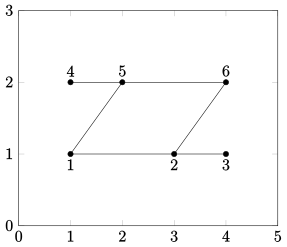
% Exercise 8-qn1(a)
A=[
    1 1 0 0 1 0
    1 1 1 0 0 1
    0 1 1 0 0 0
    0 0 0 1 1 0
    1 0 0 1 1 1
    0 1 0 0 1 1];
xy=[1 1;3 1;4 1;
    1 2;2 2;4 2];
gplot(A,xy,'k-*');
axis([0 5 0 3]);
text(1,0.9,'1');
text(3,0.9,'2');
text(4,0.9,'3');
text(1,2.1,'4');
text(2,2.1,'5');
text(4,2.1,'6');
%End
- \[\begin{split}\begin{aligned} A = \begin{pmatrix} 1 & 1 & 0 & 0 & 0 & 1\\ 1 & 1 & 0 & 0 & 1 & 0\\ 0 & 0 & 1 & 0 & 1 & 0\\ 0 & 0 & 0 & 1 & 0 & 1\\ 0 & 1 & 1 & 0 & 1 & 0\\ 1 & 0 & 0 & 1 & 0 & 1\\ \end{pmatrix} \end{aligned}\end{split}\]
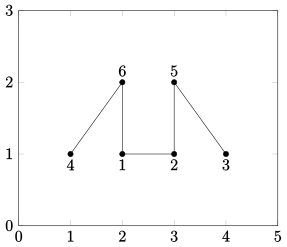
% Exercise 8-qn1(b)
A=[
    1 1 0 0 0 1
    1 1 0 0 1 0
    0 0 1 0 1 0
    0 0 0 1 0 1
    0 1 1 0 1 0
    1 0 0 1 0 1];
xy=[2 1;3 1;4 1;
    1 1;3 2;2 2];
gplot(A,xy,'k-*');
axis([0 5 0 3]);
text(2,0.9,'1');
text(3,0.9,'2');
text(4,0.9,'3');
text(1,0.9,'4');
text(3,2.1,'5');
text(2,2.1,'6');
%End
9.7.2. Answer to Exercise 9.2#
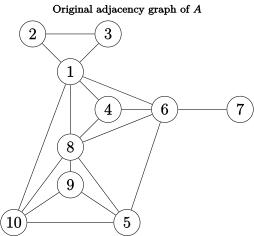
Consider the following adjacency graph:
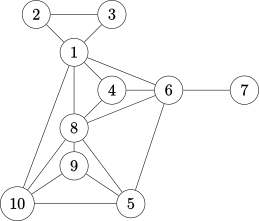
First we write down the associated adjacency matrix - it is most efficient to create a script file in MATLAB and type all of your matrices within this file for multiple use.
A=[
    1 1 1 1 0 1 0 1 0 1
    1 1 1 0 0 0 0 0 0 0
    1 1 1 0 0 0 0 0 0 0
    1 0 0 1 0 1 0 1 0 0
    0 0 0 0 1 1 0 1 1 1
    1 0 0 1 1 1 1 1 0 0
    0 0 0 0 0 1 1 0 0 0
    1 0 0 1 1 1 0 1 1 1
    0 0 0 0 1 0 0 1 1 1
    1 0 0 0 1 0 0 1 1 1]
In MATLAB use the command spy(A) to find the pattern and the
number of nonzero elements.
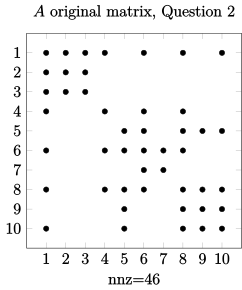
You can find the half bandwitch of \(A\) using the following commands:
>> [i,j]=find(A);
>> bw=max(i-j)

bw =
    9
Therefore the full bandwidth is \(= 9 + 9 + 1 = 19\)
Next we apply the Cuthill-McKee (CM) and reverse Cuthill-McKee (RCM) ordering algorithms to reduce the bandwidth.
we need to construct the following table
Original nodes |
No. of connections |
Results / Heads |
Queue |
Result by CM |
Result by RCM |
New nodes |
|---|---|---|---|---|---|---|
1 |
6 |
7 |
6 |
|||
2 |
2 |
6 |
4, 5, 8, 1 |
|||
3 |
2 |
4 |
– |
|||
4 |
3 |
5 |
9, 10 |
|||
5 |
4 |
8 |
– |
|||
6 |
5 |
1 |
2, 3 |
|||
7 |
1 |
9 |
– |
|||
8 |
6 |
10 |
– |
|||
9 |
3 |
2 |
– |
|||
10 |
4 |
3 |
– |
Step 1 - list all the nodes and the number of their connections (or degree) – check this with the adjacency matrix as well.
Step 2 - choose the node with smallest number of connections – here is node 7 – write it down under the Results/Heads column. Since node 7 is only connected to node 6 we write down 6 Queue column. Bring down 6 to the results column,
Step 3 - next, in the Queue column write down the list of nodes which are connected to 6 (in the ascending order of their degree or number of connections). Bring 4 down and repeat Stage 3. Avoid writing the numbers which are already listed in the Queue column and the starting node 7 – since 6, 1, and 8 are already in the Queue we put a – for node 4 in the Queue column.
Step 4 - we bring the next number down in the queue – that is 5, and repeat stage 3. We only list 9 and 10, since 6 and 8 are already listed in the queue.
Repeat Step 4 – all the connections to node 8 already in the list, so we put a – for node 8 in the Queue column.
We bring 1 down which is connected to two new nodes 2 and 3, we write down 2, 3 in the Queue column.
Next, we bring 9 and follow the above procedure until all 10 nodes are listed in the results/Head column.
Original nodes |
No. of connections |
Results / Heads |
Queue |
Result by CM |
Result by RCM |
New nodes |
|---|---|---|---|---|---|---|
1 |
6 |
7 |
6 |
7 |
3 |
1 |
2 |
2 |
6 |
4, 5, 8, 1 |
6 |
2 |
2 |
3 |
2 |
4 |
– |
4 |
10 |
3 |
4 |
3 |
5 |
9, 10 |
5 |
9 |
4 |
5 |
4 |
8 |
– |
8 |
1 |
5 |
6 |
5 |
1 |
2, 3 |
1 |
8 |
6 |
7 |
1 |
9 |
– |
9 |
5 |
7 |
8 |
6 |
10 |
– |
10 |
4 |
8 |
9 |
3 |
2 |
– |
2 |
6 |
9 |
10 |
4 |
3 |
– |
3 |
7 |
10 |
Complete results column for CM (the same as the column Results / Heads) and then reverse the CM column for RCM method, and enter the column header ‘New nodes’.
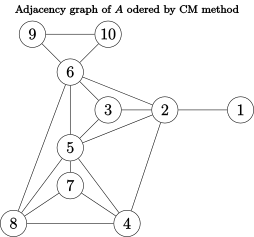
We now copy the original adjacency graph and go along the RCM column, and say that, the original node 3 becomes node 1, original node 2 remains node 2, original node 10 becomes 3, and so on.
Repeat this for CM method.
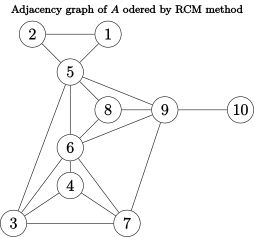
Now use MATLAB to construct the adjacency matrix B and C associated with the reordered RCM adjacency plot:
B=[
    1 1 0 0 0 0 0 0 0 0
    1 1 1 1 1 1 0 0 0 0
    0 1 1 0 1 1 0 0 0 0
    0 1 0 1 1 0 1 1 0 0
    0 1 1 1 1 1 1 1 0 0
    0 1 1 0 1 1 0 1 1 1
    0 0 0 1 1 0 1 1 0 0
    0 0 0 1 1 1 1 1 0 0
    0 0 0 0 0 1 0 0 1 1
    0 0 0 0 0 1 0 0 1 1];
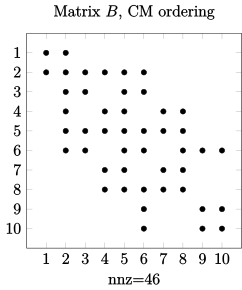
We can now find the bandwidth for the reordered matrix:
>> [i,j]=find(B);
>> bw=max(i-j)

bw = 4
Hence, the full bandwidth for the reordered matrix by CM method is \(= 4 + 4 + 1 = 9\).
C=[
    1 1 0 0 1 0 0 0 0 0
    1 1 0 0 1 0 0 0 0 0
    0 0 1 1 1 1 1 0 0 0
    0 0 1 1 0 1 1 0 0 0
    1 1 1 0 1 1 0 1 1 0
    0 0 1 1 1 1 1 1 1 0
    0 0 1 1 0 1 1 0 1 0
    0 0 0 0 1 1 0 1 1 0
    0 0 0 0 1 1 1 1 1 1
    0 0 0 0 0 0 0 0 1 1];

>> [i,j]=find(B);
>> bw=max(i-j)

bw = 4
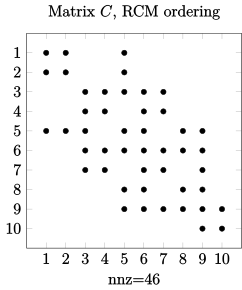
Hence, the full bandwidth for the reordered matrix by CM method is \(= 4 + 4 + 1 = 9\).
For this example matrix, both CM and RCM work equally well in reducing the bandwidth of the original matrix from 19 to 9.
Next we use the MATLAB command symrcm(A) to test our RCM
reordering result.
>> p=symrcm(A);
>> spy(A(p,p))
Next we can find the corresponding bandwidth:
>> [i,j]=find(A(p,p));
>> bw=max(i-j)

bw = 4
Hence, the symrcm command also results in a full bandwidth of
\(= 4 + 4 + 1 = 9\).
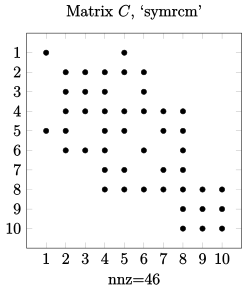
Reading form the plot of symrcm adjacency matrix, we can also
write down the associated adjacency matrix and plot:
A(p,p)=[
    1 0 0 0 1 0 0 0 0 0
    0 1 1 1 1 1 0 0 0 0
    0 1 1 1 0 1 0 0 0 0
    0 1 1 1 1 1 1 1 0 0
    1 1 0 1 1 0 1 1 0 0
    0 1 1 1 0 1 0 1 0 0
    0 0 0 1 1 1 1 1 1 1
    0 0 0 0 0 0 0 1 1 1
    0 0 0 0 0 0 0 1 1 1]
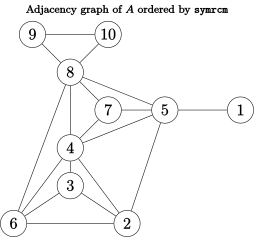
Column Count reordering:
vertex |
1 |
2 |
3 |
4 |
5 |
6 |
7 |
8 |
9 |
10 |
|---|---|---|---|---|---|---|---|---|---|---|
degree |
6 |
2 |
2 |
3 |
4 |
5 |
1 |
6 |
3 |
4 |
vertex |
1 |
2 |
3 |
4 |
5 |
6 |
7 |
8 |
9 |
10 |
|---|---|---|---|---|---|---|---|---|---|---|
original |
7 |
2 |
3 |
4 |
9 |
5 |
10 |
6 |
1 |
8 |
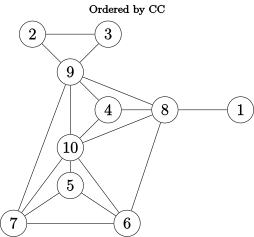
\( \mathbf{D} = \begin{pmatrix} 1 & 0 & 0 & 0 & 0 & 0 & 0 & 1 & 0 & 0\\ 0 & 1 & 1 & 0 & 0 & 0 & 0 & 0 & 1 & 0\\ 0 & 1 & 1 & 0 & 0 & 0 & 0 & 0 & 1 & 0\\ 0 & 0 & 0 & 1 & 0 & 0 & 0 & 1 & 1 & 1\\ 0 & 0 & 0 & 0 & 1 & 1 & 1 & 0 & 0 & 1\\ 0 & 0 & 0 & 0 & 1 & 1 & 1 & 1 & 0 & 1\\ 0 & 0 & 0 & 0 & 1 & 1 & 1 & 0 & 1 & 1\\ 1 & 0 & 0 & 1 & 0 & 1 & 0 & 1 & 1 & 1\\ 0 & 1 & 1 & 1 & 0 & 0 & 1 & 1 & 1 & 1\\ 0 & 0 & 0 & 1 & 1 & 1 & 1 & 1 & 1 & 1 \end{pmatrix}\)
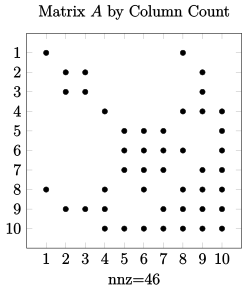
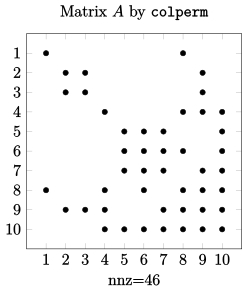
Note that D (ordered Matrix \(A\) by Column Count algorithm) is identical to Matrix A ordered by using the MATLAB command colperm i.e.
    >> q=colperm(A);
    >> spy(A(q,q))
Minimum Degree reordering
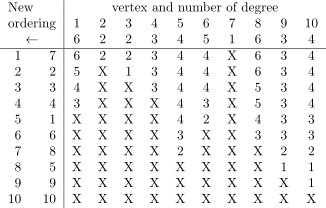
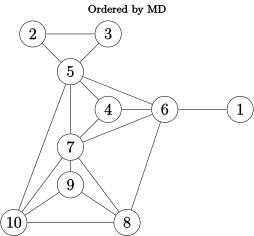
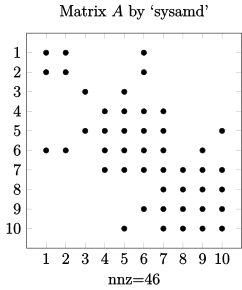
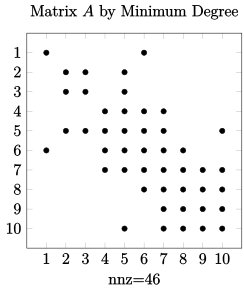
Comment – for this matrix, the MD algorithm seems to produce a
reordered matrix very similar to the sysamd function within
MATLAB, hence the algorithm works well.
Next we perform LU factorisation and check the number of nonzeros generated in the decomposition process.
See Figure 7.Q2, below. Compare the upper triangular matrix \(U\) in each case with the corresponding full matrices, i.e. original matrix \(A\), RCM (\(C\)), Column Count (\(D\)) and Minimum Degree (\(M\)), and write down the number of nonzeros generated for each case. The answer will be checked in the tutorial session.
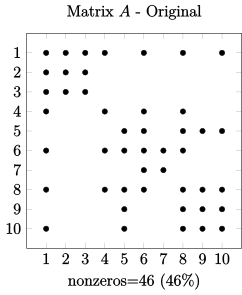
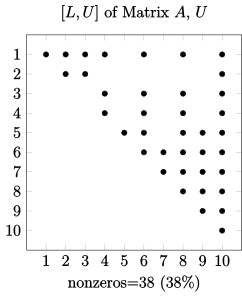
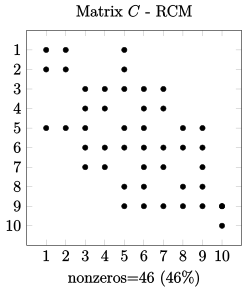
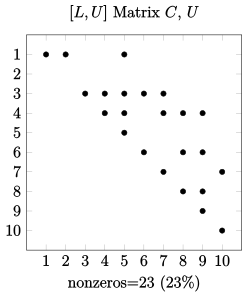
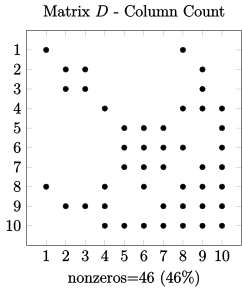
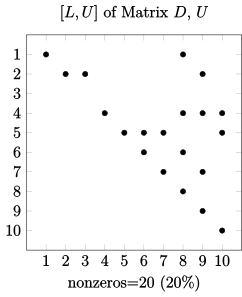
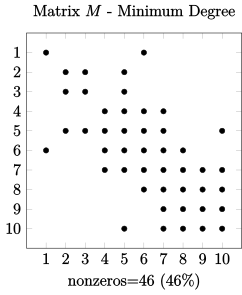
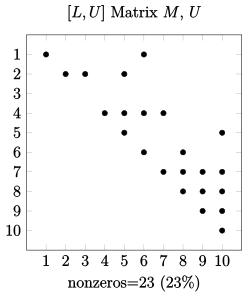
Figure 7.Q2 Comparison of ordering schemes (using the algorithms shown in Chapter 7), and their \(LU\) factorisation showing fill-ins reduction.