
9.6. Chapter 9 Exercises#
You should try the following exercise questions first, then check with the answers.
For detailed solutions, please find them in the Moodle area for this Unit.
Exercise 9.1
Write a Matlab mfile that produces the adjacency graph for the symmetric matrix A given in Example 9.10.
Modify your mfile and repeat for the matrix :
A= [1 1 0 0 0 1,
    1 1 0 0 1 0,
    0 0 1 0 1 0,
    0 0 0 1 0 1,
    0 1 1 0 1 0,
    1 0 0 1 0 1]
Exercise 9.2
Consider the following adjacency graph with 10 nodes:
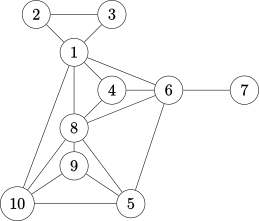
Show the corresponding adjacency matrix \(A\) and calculate its bandwidth using the MATLAB command
bandwidth(see here for this command).Reorder the matrix \(A\) using the Cuthill-McKee (CM) algorithm and label the corresponding matrix \(B\).
Reorder the matrix \(A\) using the RCM algorithm and label the corresponding matrix \(C\).
Compare the bandwidths of matrices \(A\), \(B\) and \(C\) and comment on the computational efficiency when using matrix re-ordering.
Plot the sparsity pattern of matrices \(A\), \(B\), and \(C\), and verify your results by using the MATLAB function
symrcm(A)(see here for this command).Reorder the Matrix \(A\) by Column Count (label \(D\)) and Minimum Degree (label \(M\)) schemes, write down the corresponding adjacency matrices and plot the adjacency graphs.
For the three schemes RCM, CC and MD (i.e. matrices \(C\), \(D\) and \(M\)), perform LU factorisation and record the number of fill-in elements in a table, prepare a summary result table (similar to Figure 6 shown in Section 9.5.4) and comment.